

Paradox
-
Posts
28 -
Joined
-
Last visited
Content Type
Profiles
Forums
Downloads
Store
Everything posted by Paradox
-
only thing I did was open it, scan it and test it to make sure it works then zipped it back up, scanned it again just to be positive and then uploaded it. I did use .zip instead of rar so the file was smaller and I could see your point. Even though it is public now it would be nice for you to add some sort of credit towards the original creator like it originally has. As seeing the entire project was shared and can very easily be built upon it will only be a matter of time until 20 people make some sort of edit, ignore all that and call it their own creation so thanks for at least sharing for those who get confused when they see a cmd window pop up.
-
I misspoke as there is no repo or public post where others can contribute or connect with the creator to work on it. what i meant was that inside of the zip is the .sln/csproj files, I was in a rush when posting this and just gave a general post for any info people could need but ended up having to edit it like 5 times and just forgot to edit that part.
-
as far as I know the dmap or pul file fills in the generic tiles on every map(I'm pretty sure its the dmap file) but since your missing the entire city I would like to believe that you are missing dds files which you can find in pretty much any client. just extract the data.wdf in any client ranging from 5017/5065-5730 and you should have everything for desert city. I got these images from using the tool made for tiled2dmap that Santa made and as you see it is the entire map with nothing missing other than map objs but the entire map is there so maybe you can look into his project for an idea on how to finish getting your setup complete.
-
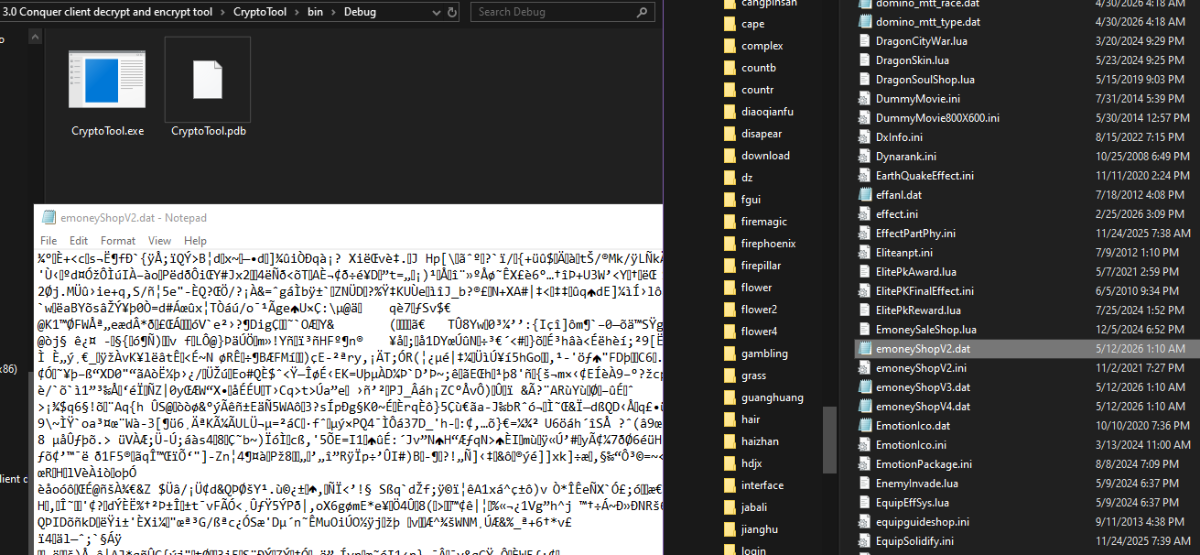
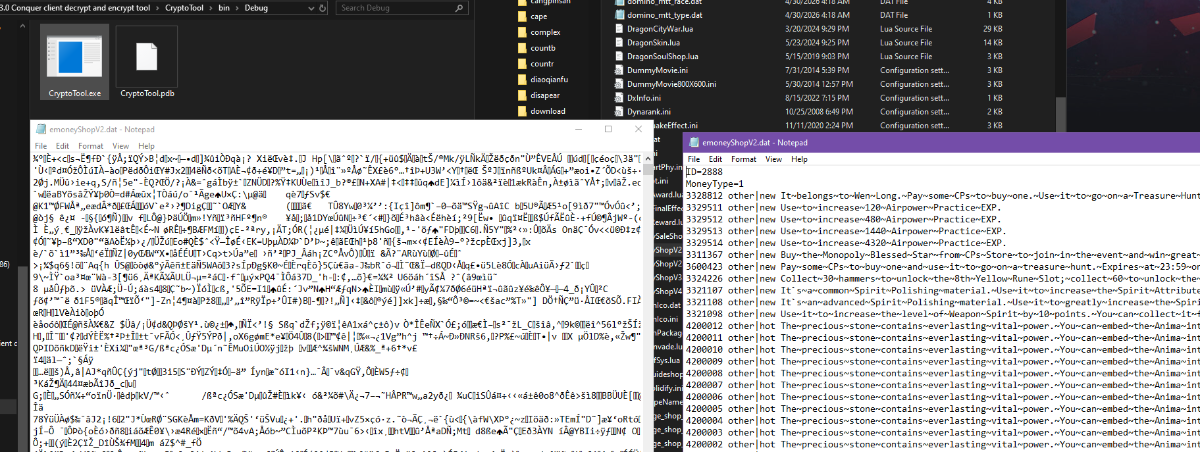
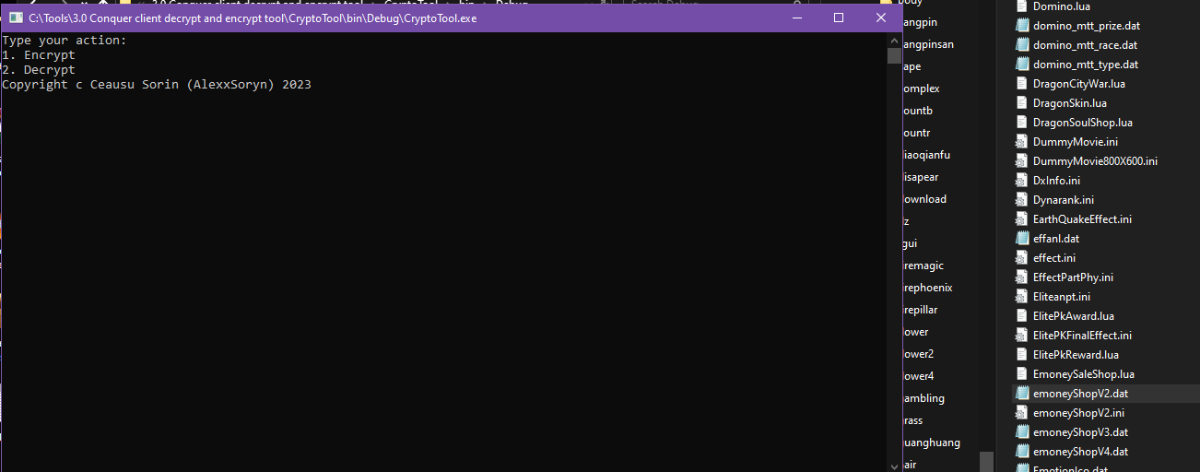
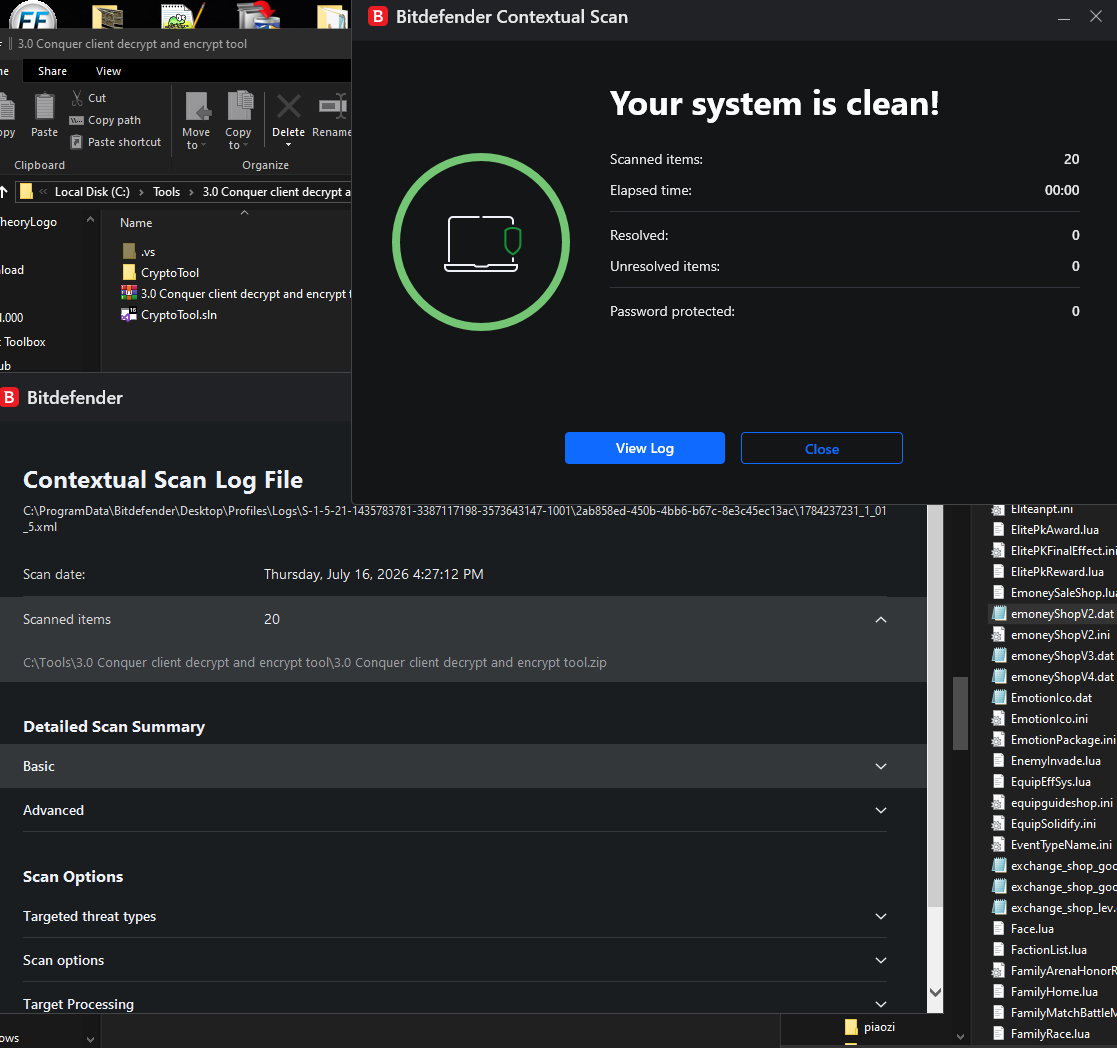
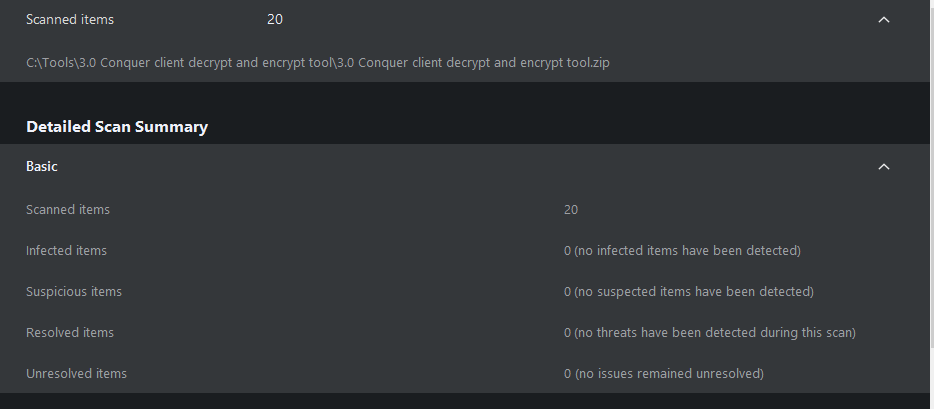
Here is a tool/project that will allow you to decrypt and then encrypt again after making changes to the majority of .dat files. All you need to do is drag the .dat file you wish to decrypt/encrypt into the exe and then either type 1 or 2 and press enter and the file you dragged will now be decrypted or encrypted again. This is not my tool and I did not make it but the original creator is sharing and posting in on forums and groups for the public so for the few here that are working on 3.0 setups I figured it would be appreciated if it was shared. its extremely basic to use and the entire VS project is there so you can build upon it however you want or make your own tool. Yes it works for itemtype and 90% of the other .dat files so now we are 1 step closer to the 3.0 client being as open as 1.0-2.0 clients. Enjoy 3.0 Conquer client decrypt and encrypt tool.zip Edit - Tool is already compiled and ready to be used feel free to scan if you dont trust bitdefender or me(which is reasonable since I am newer here) 3.0 Conquer client decrypt and encrypt tool.zip

-
this "version" of the source you are using right now was posted on a couple facebook groups. there are a ton related to conquer online and a couple that actually share stuff and help eachother out but most of them are mainly Egyptian so expect a bunch of Arabic and since it is so open expect bunch of bs and recycled/useless posts.
-
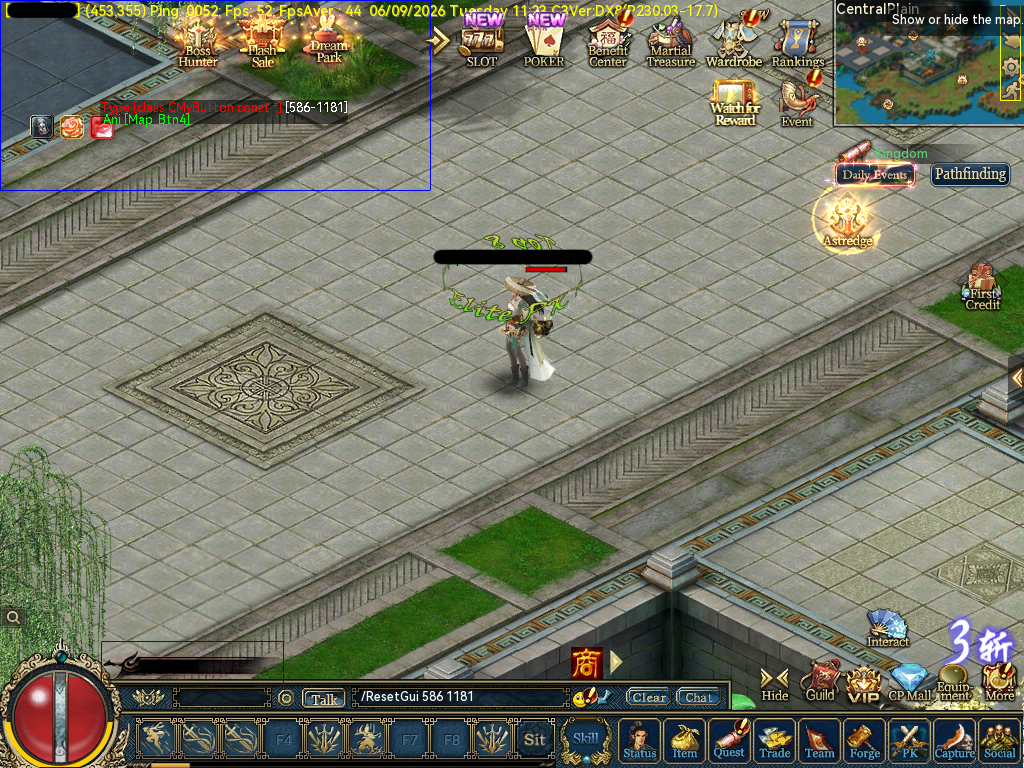
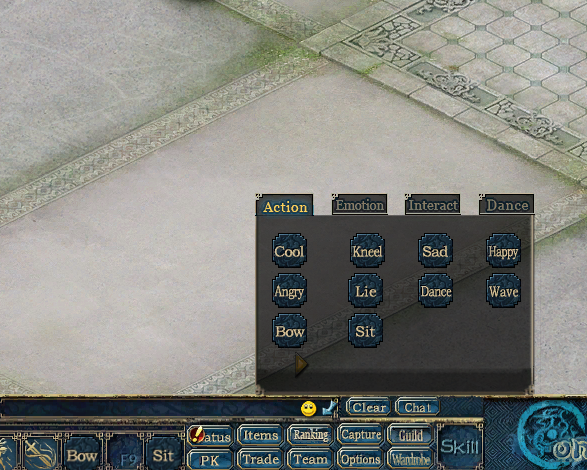
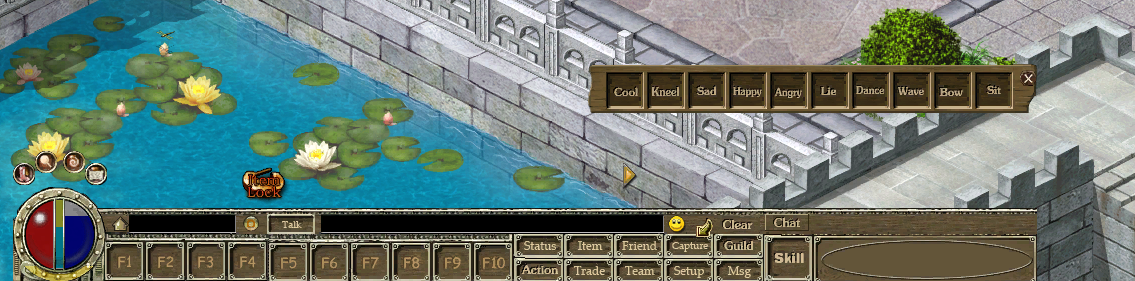
regarding the parent box(red) and the issue with moving the clickable area/child box(yellow) you can make the parent box as big as you want or as big as the screen and then you will be able to move the clickable area/button/gui to wherever you want. the only problem you might come across is it being under or above some other part of the GUI but that is a simple fix by adding a line like "ChickToTop=1" or "ChickToTop=0" inside of the gui.ini file for that exact GUI setup. I have made other posts to help others out when this was brought up but since this was such an informative post and i noticed you ask about a solution i figured i would share something that might help others. all i did was use the enable and disable focus commands along with control.ani and gui.ini to make changes accurately, yes it sucks closing and opening the client a million times but you can essentially do anything you want to the client UI and make it look however you want from any other patch or completely custom. I cant say that i know what all these do but here are some GUI text that control height, font type and size, escape button to close and zoom amount on the ani/dds image you use for that button/element. *These can all use 0 or 1 and potentially higher or lower numbers for different outcomes* EscEnable=0 ChickToTop=0 SetBottomInMoveBind=0 Base=0 up to 8(possibly higher not tested) something like these control what other guis close, move behind or off focus. for example when you open something with multiple tabs like the wardrobe gui where it has multiple pages and tabs that open, close and move. It has been a little bit since i have done some work related to GUI so bear with me but these IDs/numbers on the closebind and movebind are either the parent ID or child ID so either 0-130(parent) or 130-342(child) CloseBind=589 MoveBind=589,593,592,657,658,659,660,661,664 - these numbers are other IDs in GUI.ini this GUI code/line links to info or a line for text(usually) from either Cn_res.ini, UStrRes.ini or Server_Cn_Res.ini strTipInfo=STR_ZHUJIEMIAN_TITLE2 these control font size and also uses text from either Cn_Res.ini, UStrRes.ini or Server_Cn_Res.ini, text= is what grabs the text from the ini file and fontsize is self explanatory FontColor=0xffefe0c7 text=STR_GANG_TIPS_LIANQIPHB16 FontSize=16 This image is from a 7916 client so it is 3.0 and around a month behind retail right now. the buttons on the bottom main UI like wardrobe and ranking required me to use "ChickToTop=1" so they were not underneath the main UI file/image as they were both originally on top of the screen not underneath or on top of anything. Also regarding your comment about the settings button, you can clearly see i was able to move it all the way to the bottom of the screen and make it fit the classic themed UI. All of the buttons work exactly like a 5065 or any other below 5517 client. I still have some work to go but when i am done you will not be able to tell the difference and all of this work was done with only the enable/disable focus commands, gui.ini, control.ani and a little bit of time to search for file names and to go through any other necessary file. hope this helps whoever may need some info on client work! how my 7916 s4etup looks after the gui.ini and control.ani work How my 7916 setup originally looked before the changes i made in gui.ini and control.ani
-
the Dmap files are inside of the .7z files. just extract them and make sure the names are correct/matching. try to spend some time exploring the client if your gonna get into the world of maps/conquer related client stuff. there are 2 links and one of them has all of the main city maps and the other should have just about every known conquer map. you can also get the dmap/pul files from any client within the range i posted, just make sure to check the map first like tc to see if it is the newer or older plains design. EDIT- keep in mind that some maps are not named the same, as twincity is newplain and Ape city is newcanyon.
-
that is good advice on something to look into but if he is using any type of public source or some "bought" source there is a 98% chance that it uses plaintext account info and is expecting that. Should be one of the very basic things that every server should be setup for but for some reason that has been forgotten/ignored. I cant say for sure but im almost certain he is using some sort of this 6609 source that had a edited version of it released not long ago and it is just another "alex" base source which would then tell you that it definitely does not encrypt anything related to account info. I just went through that source to double check since most account servers that are public dont use that color from what ive seen in my many years of testing and im like 99.999% sure he is using that source and he would 100% be getting a line saying "so and so account tried logging in on this ip" if the account server was setup correctly. To the posts OP - I suggest going through your account server and making sure it is properly setup, just because it starts up and shows your ip and all that does not mean it is working properly. My bet is that it is not hooked up to your DB correctly as there are a ton of people using this 6609 source without this issue you are having. open it in VS and search for "localhost" or "root" and make sure it is setup to connect to your DB and keep in mind like i said before if your DB is named "test" make sure you are not using "TEST" or "Test" on accident because that could cause an issue. also make sure the loader is fully setup on the game server and account server, if all is correct when you go to sign in you will get a new line on the account server first saying so and so tried to login and then after that you will get the same thing on the game server once you get passed the "logging into account server".
-
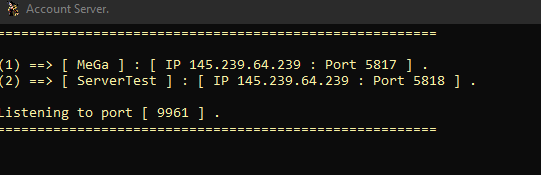
if the image of your account server is how it looks even after you try to log in then yes your account server is not configured correctly. normally you would see some type of login attempt but you need to make sure that the account server is properly connected to the loader as well since you have changed it and make sure your account server is connected to the exact database you are using also. keep in mind almost everything if not everything is Cap sensitive so if your db is "Test" and you put "test" in your account server then it wont connect properly.
-
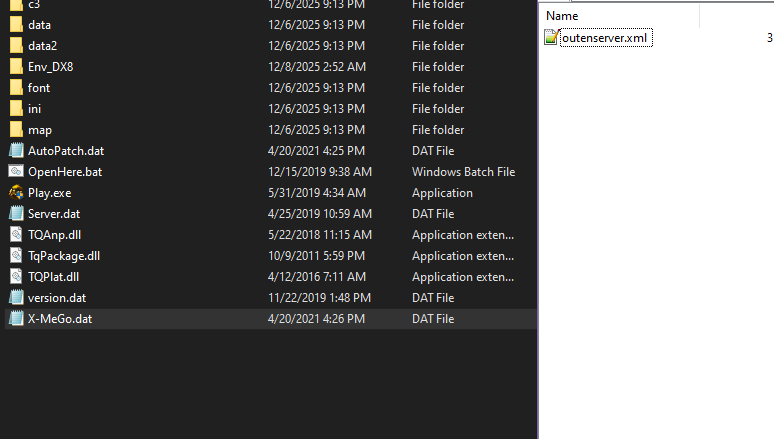
even though your question has been answered I will add that there are a ton of free loaders on the market that allow you to change the IP but most purchased loaders tend to have locked .dat files that have your connection info so you cant just use the loader they made for it across many setups or any host without talking or dealing with the creator. I have not spent much time on 6609 setups but there are so many sources/loaders out there for 6609 setups that you can download another source or loader and transfer it over to your specific source so you can have it changeable whenever. Before going through all of that bs though try right clicking on the guard.dat and opening it with 7zip, a lot of loaders that are not specifically locked require you to use 7zip to gain access to a file called "outenserver" which from there you can change the IP and whatever else you want to your IP and server name. I attached a photo in this message that is of an open loader for a 6609 setup that requires you to use 7zip to gain access to the connection config file. If you haven't had your situation taken care of already I hope this info helps!
-
[Source 6609] How to change the default active tab in Forging UI
Paradox replied to NourSoliman's topic in Conquer Online
oh yeah 100%. I don't plan on making any source release threads specially when they aren't mine. it is best to just assume the worst with any source downloaded online. people know they will get downloaded by a ton of people who barely know how to start a win defender scan so some of them will definitely add stuff to it to try and grab login info and a whole bunch of other bs. I see kenny is fairly active and is trying to put forth some effort to keep the community alive (if you can even consider it alive nowadays) so just wanted to give whatever info I could on the question he asked. -
[Source 6609] How to change the default active tab in Forging UI
Paradox replied to NourSoliman's topic in Conquer Online
as of right now I don't think there is any public posted sources that high of a patch and anything being sold is either public garbage that was updated or someone's personal garbage that is the same public stuff that has a couple bugs fixed and some events added or changed to make it so they are the "Source creator" in whatever they call a brain, either way not worth the trouble. the highest patch source I've come across that can be started and almost everything is there is around the 7768-7770 area but it obviously has a bunch of bugs/issues and is an "Alex" base source or whatever its called. There is also another "Alex" source that is 7809 or 7810 but it is semi start up ready, just needs the INI DB added which is basic to do because they all use the same DB plus or minus a couple files for certain features. Both have loaders with them, I'm not entirely sure on the forum rules but if you are interested in them i can DM the links for them as long as it is not breaking any rules. -
[Source 6609] How to change the default active tab in Forging UI
Paradox replied to NourSoliman's topic in Conquer Online
ah i did not notice this OP was focused only on 6609 at the time. my main work as of lately while trying to learn all of this stuff is 7762-7772 and 7901-7918, the most recent photo i sent was from a 7901 client. "3.0" didn't officially happen until 6610 according to the official website. i dont think lua being used is recent at all but might not be as major in the 6609 client so not sure if my post was useful at all. I do know that there is some .lua files inside the 6609 client patch and they might be of use to you in your journey -
[Source 6609] How to change the default active tab in Forging UI
Paradox replied to NourSoliman's topic in Conquer Online
im not entirely sure what "action button" you are talking about but there is a possibility I know what you are talking about and have already worked on it or messed with it. i ended up moving up to the latest patch retail CO is on to make sure future proofing is at its fullest capacity. are you talking about this action button? I have not gotten into removing buttons and moving them to different IDs or anything quite like that yet but from my understanding with how different the 3.0 clients are and how much LUA is used in it now you should be able to do just about anything with the gui. you could find where the emoji icon is and replace it with the older "action" button image and then adjust how the child IDs are laid out so they are in a line and change the background as well. it all can be done through gui.ini, control.ani and inside of the data folder. you really wouldnt even have to edit it control.ani unless you want to add new buttons/image IDs for gui.ini to grab from. it can all be done fairly easily since you can just null out the interact, dance and emotion tabs or set it up in a way to add a button on the action tab that will then open the emojis. hopefully thats what you were talking about and sorry for the mess of writing **edit** just looked through the ini folder on a 3.0 client and from my understanding you can literally add your own GUI buttons/IDs and then edit a file like "MainSimple.lua" to make that button you just made show up on screen and then from there you would need to link it to something either through a custom made lua file or through the lua file that originally controlled that feature.
-
not sure if this will help you much but here is a no effects file for players to use on startup if they dont want effects on, it is for a 5695 server/client. you can use a wdb manager/tool and decrypt it and look at the files to compare it to the client you are working on and so you get an idea of how disabling effects works. you can also edit "Action3DEffect.ini" or make it blank and that will kill all effects on garments, mounts, weapon accessories and iirc other effects like dragon souls and what nots. If you are trying to make things load in quicker then i would look into making mesh and texture files on all the files in the c3 folder smaller, the smaller the files the quicker they load for example most conquer online garms are around 30-60kb for the mesh and texture files but most garms made by other people are around 150kb up to 1mb for the mesh and texture files. if you have one person wearing a garment that has a mesh file over roughly 250kb it will cause everything to take longer to render/load in. lets say that player is sitting in twin city square and is wearing a garment that has around a 300-400kb .c3 mesh file size, when you first teleport to twin city or start up the client it will take longer than normal for everything to load like npcs, players, guards, monsters and what nots. in terms of trying to actually optimize the conquer client itself you will be doing a whole lot more than editing a couple ini files. I suggest looking into the mesh and texture file sizes in your client and using blender to make them smaller. "factory" conquer online stuff loads in for the most part instantly and there really shouldn't be any lag at all in game unless there was something "aftermarket" causing it like heavy files, unstable host or maybe even a shit source. everything related to figuring out step 1 is looking through the c3 folder, there are .c3 files and .dds files the .c3 files are the mesh and the .dds files are the texture. its all controlled in the ini folder through 3DEffect.ini, 3DEffectObj.ini, 3dobj.ini, 3dtexture.ini and then Action3DEffect.ini is how you attach the effects to an items ID and then there is other files like weapon.ini and armor.ini that are for adding gear in game along with the other files i stated in this message. sorry if my messages are a bit messy or difficult to read i tend to carry on and go all over the place but for the most part that is 99% of the info needed to look around at how its all controlled or handled in the clients and that is on any patch. DisableEffect.exe
-
[Source 6609] How to change the default active tab in Forging UI
Paradox replied to NourSoliman's topic in Conquer Online
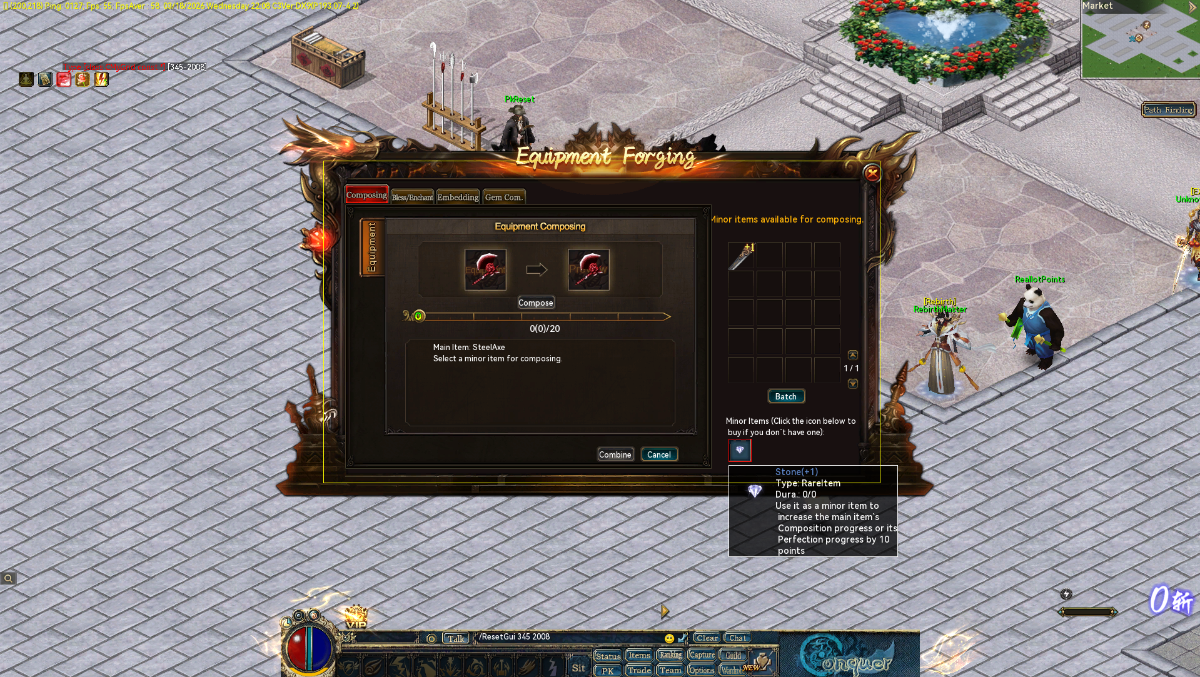
I did exactly that in my process of making a 3.0 setup "classic". this is what I did for my WuxingOven npc to make it so players had to talk to that npc to open the forge menu, its also removed from the main UI and was edited in gui.ini so only classic like features were there. All they do is click on the npc like normal and then choose that they want to compose or bless there gear through the npc dialog and when they choose that option this forge menu opens. I had an issue with opening specific pages so it was a bit easier to just have the oven npc control/advertise those 4 forging areas instead of having an npc for each upgrade type like a blessing npc, enchantment npc and gem npc, which is what I wanted to originally do. if you can figure out how to make it open an exact page then maybe you can bless me with some info back but I did try a ton of different things to open specific pages, just couldn't get it to work. IIRC it defaults to the compose page when first opened. case 1: { ActionQuery action = new ActionQuery() { Type = ActionType.ClientCommand, ObjId = client.Player.UID, dwParam = 0, PositionX = client.Player.X, PositionY = client.Player.Y, Timestamp = (uint)Time32.timeGetTime().GetHashCode(), Strings = new string[] { "LuaUIMgr_OpenWindow|335" }, }; client.Send(stream.ActionCreate(action)); break; }
-
yeah its unreal how big 30kx20k png images are size wise lol. thats how i got all of these, the 12gb file is around 200 maps iirc and the smaller file is just tc, dc, bi, ac and pc. I figured there is probably a ton of people who are good with PS and other editing stuff in the conquer community but dont have a way to use any of that knowledge/skill because nobody has ever shared full proper resolution images and placing each dds image together 1 by 1 blows so hope this will help some people out there. They could also use tiled2dmap to reverse them back into dds images or atleast properly sized images that you can convert back into .dds types if im not mistaken and then just replace the files back in the client and there ya go custom maps. Even if it helps just 1 person im happy with it.
-
i just made a post with the pngs here a couple hours ago. the tile2damp setup is public also
-
Have yet to see anyone make a release or share anything like it so here is the conquer online main city maps turned into a 1:1(as far as i know) copy of how it would look as a png. Most map programs use PNG images or other types of high resolution images to turn that picture into a map but not everyone has the ability to do so or there is something similar like not having original map files that is stopping them from making custom city edits so here you guys go! all i ask for is a thanks and if you make some edited version of the main cities please share them back to brighten the community a bit. I have personally used them to make a new map as a test and they are exactly the same size as the original maps along with placement of the town placements. Keep in mind that there is no map objects or anything else on these images so you would either reuse the original map objects or add your own with a map maker/editor tool. https://mega.nz/file/xzljwRzI#84vWgLG6sNKr_pA4tJiQoL4FNIFjWUUXKkxnIjEogUc https://drive.google.com/file/d/1n0CgTwb1W9peJFzIYQmGECa0ufh308aG/view?usp=sharing the first two links are of just the main cities and this link below is just about every map in the client ranging from 5017 up to 6609, enjoy! https://drive.google.com/file/d/134HqQEwEHjvRiQYZLVAExEmhlLLTz6H3/view?usp=sharing
-
maps are fairly easy to get nowadays. the program santa did with tiled2dmap will make you high resolution pngs of any conquer online map thats in the client. high res like 24kx32k pixels. I have just about every single CO map out there, might be worth making a post on
-
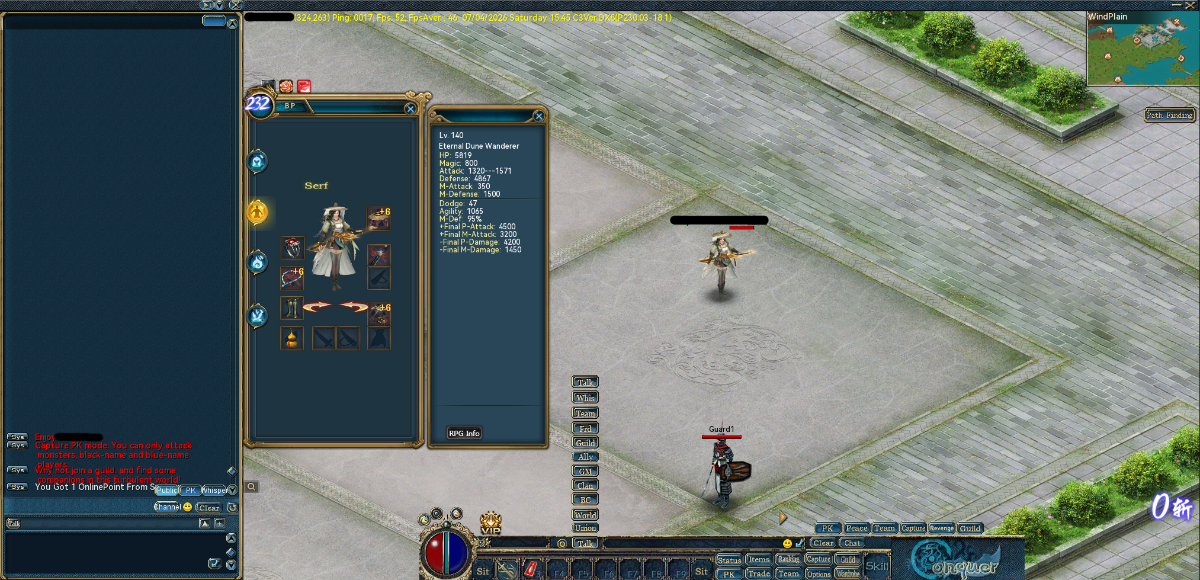
yes i do like the newer style that happened once they went 3.0 officially. I feel the client is much smoother and has a ton of features that servers throughout the years have spent time adding for QOL changes/options. the reason im not a huge fan of the new character models and all that is because i have over 1000 garments laying around along with weapon accessories(which could be weapons or souls too) but all of that is useless once you get to the different character model part. I will say that after messing around with the most recent patches i am beginning to like it even more, the custom faces like actual character model faces, hair/hats/masks like cosmetics instead of just hair and hair color, unique garms, wep accs, pets, animated and non animated avatar frames, custom chat bubble frames/boxes and just so much more. client wise I am done turning it into a classic setup but source end it will still take me a bit to be comfortable enough to launch with enough for players to do to grow and have fun without it becoming boring fairly quick. the endless future proofing is a huge positive and one of the major things is that some classes ruined pvp for older players or just went down the wrong path so if the players decide they want me to add assassin to make archers not be so useless in pvp but dont add any other classes then that can be done. Will finish adding Dune Wanderer as well once its fully done and keeps up with other classes so there is not 1 class of feature that retail CO has that this server wont. the main focus again is just "Future" proofing instead of running into a major job trying to add newer client features plus i can then share things related too it and maybe help create even better projects/servers.
-
best bet as of right now since there arent many tools/programs around to help with much client wise if you end up needing one and cant make something from scratch. encryption and a bunch of other stuff has changed after 6610 including character models. the new GW is an updated map with multiple poles and these gem like things that drop on the ground that add towards your points(not sure if it helps to win gw or if its a different event), you also have mobs you can spawn as the GL to help attack the pole/players, heal teammates or buff teammates etc etc. there is a ton of features that have been added over the years. For the most part you can make an exact classic conquer style setup from patch 5165(and lower obviously) all the way up to 6609 by just doing small changes to the gui.ini file and preventing other classes/skills and what nots being used. plenty of "classic" servers out nowadays that run on the 6609 patch since it allows you to future proof for any retail additions and anything you dont want can be removed extremely easily. besides maybe a difference in how the client feels gameplay wise there really is no reason to use any other patch setup besides 6609+ from my pov. there is probably other reasons from some but i cant really think of any.
-
I totally agree with you on the whole armor/weapon model situation. they clearly got extremely lazy halfway through the expansion or just decided to make all of that extremely low cost when it came to having to make gear for all of the classes again since the character model swaps. I stopped playing retail around when monk dropped so almost all of this is fairly new to me besides servers I have played on, watched and the occasional account check on retail. Not a big fan of most of the stuff they did but I do think they sorta started going down the right route with pvp and skills so fights can be a bit more intense but with the original layout/design of the game there is not much more you can do without drastically changing it all. would love to swap the models to the 6609 models or older and then just re add all of the armor and what nots but I don't foresee that being feasible as of right now and there aren't very many who want to play on a retail patch server so anything classic up until wind walker is what 99% of the servers out there are gonna be. hopefully conquer doesn't die completely to soon from now and we can experience some more unique servers that aren't way over kill
-
yes that has been a bit of a stumble for sure but I have been able to get by with tools that are either public or were given to me so most of that has been dealt with. so far with what i have setup client wise there is no way to access features that were added after lets say 5165/5517 besides things i have edited and kept or added like ranking and the wardrobe system which have both been edited so no mounts, wings or anything like that can be accessed. I know many aren't to focused on higher patch setups because most servers are alive through nostalgia and how it was when things were "good" but from my personal pov i think the 3.0/6609+ client has much more for us to learn even though it is essentially the same as the 2.0 client there is more that can be done or made. the one major change im not a huge fan of is the character model changes and i would like to revert it but that would be a fairly huge job from my understanding. I appreciate your input even though I figured it out shortly after making the post, i noticed the huge jump to barely any lua files to them being just about everywhere so i figured it was worth looking into. Personally i think the 3.0 clients run a lot smoother than the lower patch clients especially when you remove all the eye cancer but might be just be a placebo effect, maybe as time goes we will all discover more and more interesting things or worthwhile things from these higher end clients.
-
Update** you can close this post, I figured out that it was controlled inside info.ini by editing one block to only give certain classes. as I always enjoy those who help with issues and post the solution here it is, If anyone else is interested in doing the same as me feel free, here is the info.ini changes I made // 选人界面相关配置 [RoleSelect] //备注:0道士-1弓手-2海盗-3勇士-8铁扇-4小龙-5武僧-6忍者-7战士-9斗神 // 显示顺序 ViewSort=1-7-8-9-4-0-2-5-3-6 // 一级界面各个职业X轴方向的偏移调整(相对于背景框) ViewOffset=-55,-70,-80,-70,-55,-50,-50,-70,-70,-70 // 职业对应索引值 ViewParam=4-5-6-7-16-17-20-21-14-15-0-1-12-13-10-11-2-3-8-9 // 二级界面各个职业图标序列帧总数 CreateRoleMaxFrame=10 changed to // 选人界面相关配置 [RoleSelect] //备注:0道士-1弓手-2海盗-3勇士-8铁扇-4小龙-5武僧-6忍者-7战士-9斗神 // 显示顺序 ViewSort=7-3-1-0 ViewOffset=-70,-70,-70,-70 ViewParam=6-7-8-9-4-5-0-1 CreateRoleMaxFrame=4 Again feel free to close this post sorry for making this post since I happened to solve it before getting any input.