Paradox
-
Posts
24 -
Joined
-
Last visited
-
this "version" of the source you are using right now was posted on a couple facebook groups. there are a ton related to conquer online and a couple that actually share stuff and help eachother out but most of them are mainly Egyptian so expect a bunch of Arabic and since it is so open expect bunch of bs and recycled/useless posts.
-
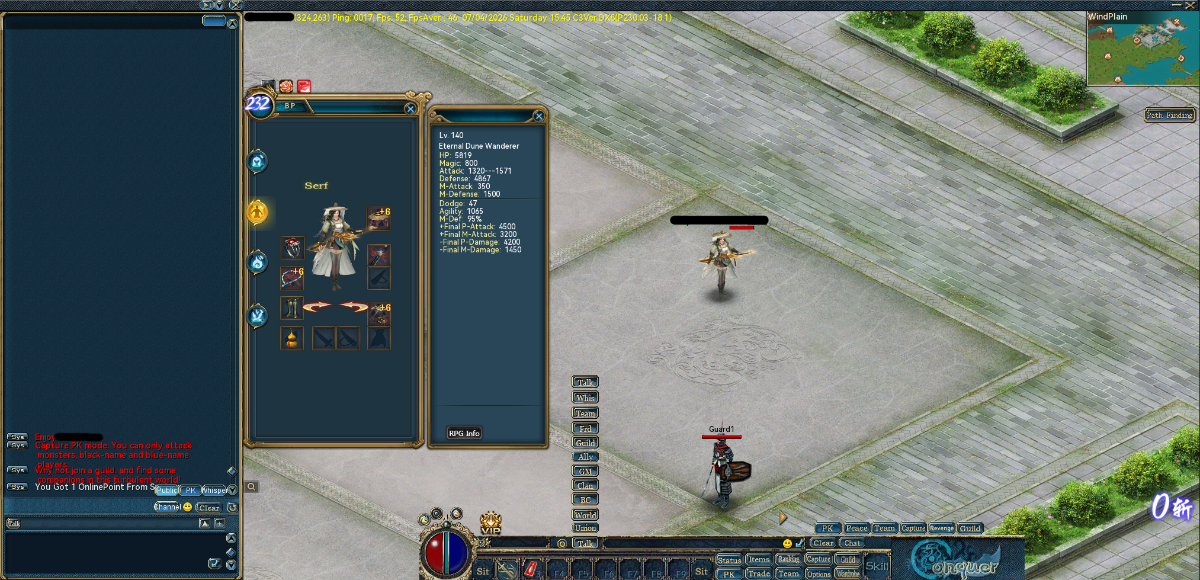
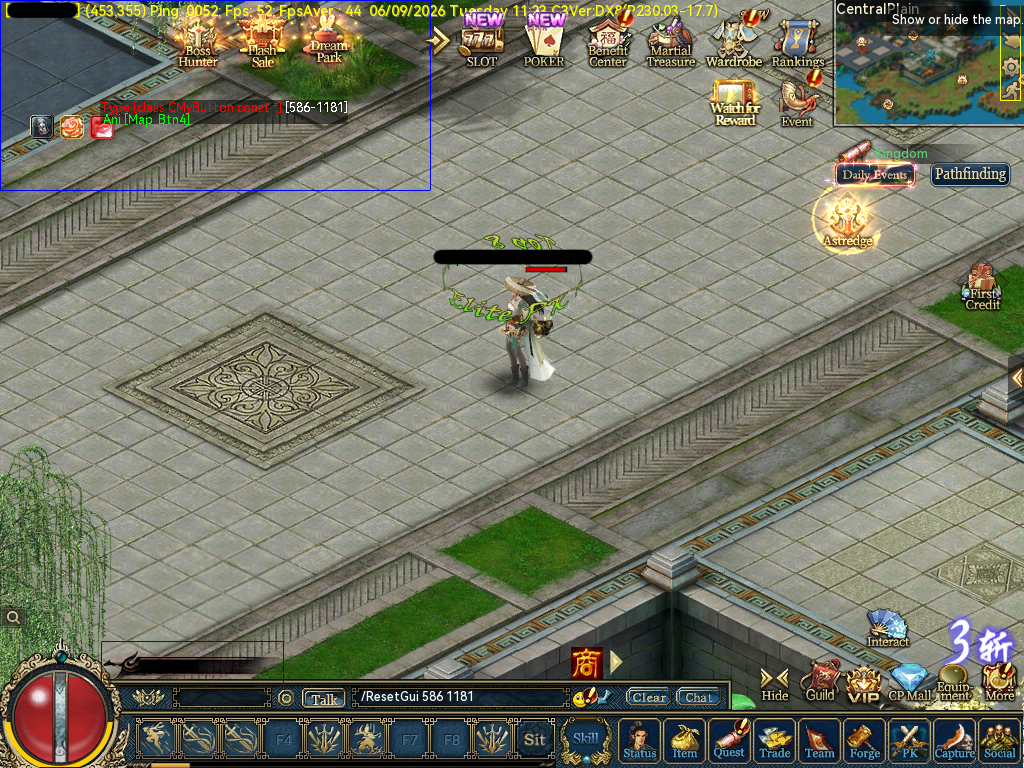
regarding the parent box(red) and the issue with moving the clickable area/child box(yellow) you can make the parent box as big as you want or as big as the screen and then you will be able to move the clickable area/button/gui to wherever you want. the only problem you might come across is it being under or above some other part of the GUI but that is a simple fix by adding a line like "ChickToTop=1" or "ChickToTop=0" inside of the gui.ini file for that exact GUI setup. I have made other posts to help others out when this was brought up but since this was such an informative post and i noticed you ask about a solution i figured i would share something that might help others. all i did was use the enable and disable focus commands along with control.ani and gui.ini to make changes accurately, yes it sucks closing and opening the client a million times but you can essentially do anything you want to the client UI and make it look however you want from any other patch or completely custom. I cant say that i know what all these do but here are some GUI text that control height, font type and size, escape button to close and zoom amount on the ani/dds image you use for that button/element. *These can all use 0 or 1 and potentially higher or lower numbers for different outcomes* EscEnable=0 ChickToTop=0 SetBottomInMoveBind=0 Base=0 up to 8(possibly higher not tested) something like these control what other guis close, move behind or off focus. for example when you open something with multiple tabs like the wardrobe gui where it has multiple pages and tabs that open, close and move. It has been a little bit since i have done some work related to GUI so bear with me but these IDs/numbers on the closebind and movebind are either the parent ID or child ID so either 0-130(parent) or 130-342(child) CloseBind=589 MoveBind=589,593,592,657,658,659,660,661,664 - these numbers are other IDs in GUI.ini this GUI code/line links to info or a line for text(usually) from either Cn_res.ini, UStrRes.ini or Server_Cn_Res.ini strTipInfo=STR_ZHUJIEMIAN_TITLE2 these control font size and also uses text from either Cn_Res.ini, UStrRes.ini or Server_Cn_Res.ini, text= is what grabs the text from the ini file and fontsize is self explanatory FontColor=0xffefe0c7 text=STR_GANG_TIPS_LIANQIPHB16 FontSize=16 This image is from a 7916 client so it is 3.0 and around a month behind retail right now. the buttons on the bottom main UI like wardrobe and ranking required me to use "ChickToTop=1" so they were not underneath the main UI file/image as they were both originally on top of the screen not underneath or on top of anything. Also regarding your comment about the settings button, you can clearly see i was able to move it all the way to the bottom of the screen and make it fit the classic themed UI. All of the buttons work exactly like a 5065 or any other below 5517 client. I still have some work to go but when i am done you will not be able to tell the difference and all of this work was done with only the enable/disable focus commands, gui.ini, control.ani and a little bit of time to search for file names and to go through any other necessary file. hope this helps whoever may need some info on client work! how my 7916 s4etup looks after the gui.ini and control.ani work How my 7916 setup originally looked before the changes i made in gui.ini and control.ani

-
the Dmap files are inside of the .7z files. just extract them and make sure the names are correct/matching. try to spend some time exploring the client if your gonna get into the world of maps/conquer related client stuff. there are 2 links and one of them has all of the main city maps and the other should have just about every known conquer map. you can also get the dmap/pul files from any client within the range i posted, just make sure to check the map first like tc to see if it is the newer or older plains design. EDIT- keep in mind that some maps are not named the same, as twincity is newplain and Ape city is newcanyon.
-
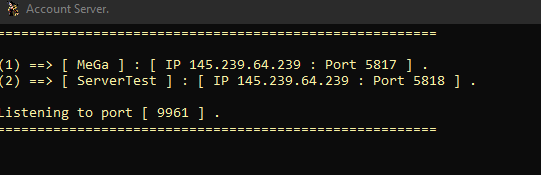
that is good advice on something to look into but if he is using any type of public source or some "bought" source there is a 98% chance that it uses plaintext account info and is expecting that. Should be one of the very basic things that every server should be setup for but for some reason that has been forgotten/ignored. I cant say for sure but im almost certain he is using some sort of this 6609 source that had a edited version of it released not long ago and it is just another "alex" base source which would then tell you that it definitely does not encrypt anything related to account info. I just went through that source to double check since most account servers that are public dont use that color from what ive seen in my many years of testing and im like 99.999% sure he is using that source and he would 100% be getting a line saying "so and so account tried logging in on this ip" if the account server was setup correctly. To the posts OP - I suggest going through your account server and making sure it is properly setup, just because it starts up and shows your ip and all that does not mean it is working properly. My bet is that it is not hooked up to your DB correctly as there are a ton of people using this 6609 source without this issue you are having. open it in VS and search for "localhost" or "root" and make sure it is setup to connect to your DB and keep in mind like i said before if your DB is named "test" make sure you are not using "TEST" or "Test" on accident because that could cause an issue. also make sure the loader is fully setup on the game server and account server, if all is correct when you go to sign in you will get a new line on the account server first saying so and so tried to login and then after that you will get the same thing on the game server once you get passed the "logging into account server".
-
if the image of your account server is how it looks even after you try to log in then yes your account server is not configured correctly. normally you would see some type of login attempt but you need to make sure that the account server is properly connected to the loader as well since you have changed it and make sure your account server is connected to the exact database you are using also. keep in mind almost everything if not everything is Cap sensitive so if your db is "Test" and you put "test" in your account server then it wont connect properly.
-
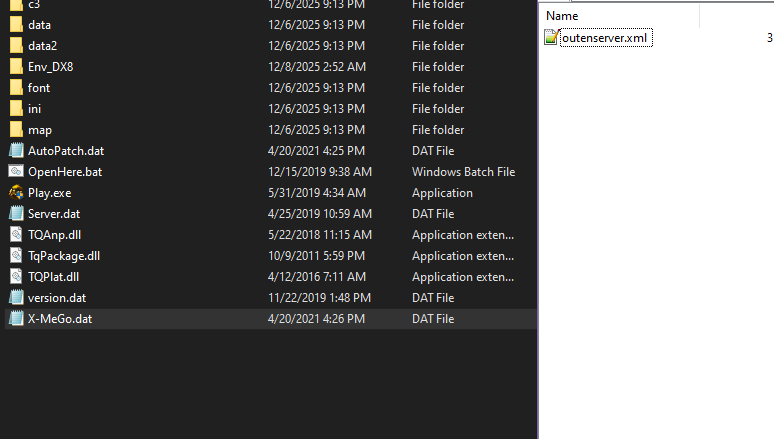
even though your question has been answered I will add that there are a ton of free loaders on the market that allow you to change the IP but most purchased loaders tend to have locked .dat files that have your connection info so you cant just use the loader they made for it across many setups or any host without talking or dealing with the creator. I have not spent much time on 6609 setups but there are so many sources/loaders out there for 6609 setups that you can download another source or loader and transfer it over to your specific source so you can have it changeable whenever. Before going through all of that bs though try right clicking on the guard.dat and opening it with 7zip, a lot of loaders that are not specifically locked require you to use 7zip to gain access to a file called "outenserver" which from there you can change the IP and whatever else you want to your IP and server name. I attached a photo in this message that is of an open loader for a 6609 setup that requires you to use 7zip to gain access to the connection config file. If you haven't had your situation taken care of already I hope this info helps!
-
[Source 6609] How to change the default active tab in Forging UI
Paradox replied to NourSoliman's topic in Conquer Online
oh yeah 100%. I don't plan on making any source release threads specially when they aren't mine. it is best to just assume the worst with any source downloaded online. people know they will get downloaded by a ton of people who barely know how to start a win defender scan so some of them will definitely add stuff to it to try and grab login info and a whole bunch of other bs. I see kenny is fairly active and is trying to put forth some effort to keep the community alive (if you can even consider it alive nowadays) so just wanted to give whatever info I could on the question he asked. -
Paradox changed their profile photo
-
[Source 6609] How to change the default active tab in Forging UI
Paradox replied to NourSoliman's topic in Conquer Online
as of right now I don't think there is any public posted sources that high of a patch and anything being sold is either public garbage that was updated or someone's personal garbage that is the same public stuff that has a couple bugs fixed and some events added or changed to make it so they are the "Source creator" in whatever they call a brain, either way not worth the trouble. the highest patch source I've come across that can be started and almost everything is there is around the 7768-7770 area but it obviously has a bunch of bugs/issues and is an "Alex" base source or whatever its called. There is also another "Alex" source that is 7809 or 7810 but it is semi start up ready, just needs the INI DB added which is basic to do because they all use the same DB plus or minus a couple files for certain features. Both have loaders with them, I'm not entirely sure on the forum rules but if you are interested in them i can DM the links for them as long as it is not breaking any rules. -
[Source 6609] How to change the default active tab in Forging UI
Paradox replied to NourSoliman's topic in Conquer Online
ah i did not notice this OP was focused only on 6609 at the time. my main work as of lately while trying to learn all of this stuff is 7762-7772 and 7901-7918, the most recent photo i sent was from a 7901 client. "3.0" didn't officially happen until 6610 according to the official website. i dont think lua being used is recent at all but might not be as major in the 6609 client so not sure if my post was useful at all. I do know that there is some .lua files inside the 6609 client patch and they might be of use to you in your journey -
[Source 6609] How to change the default active tab in Forging UI
Paradox replied to NourSoliman's topic in Conquer Online
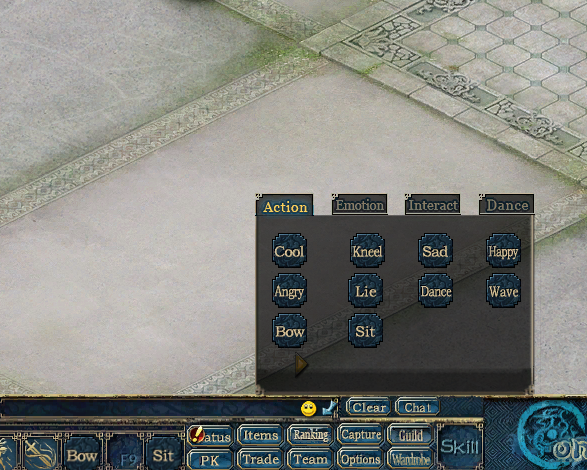
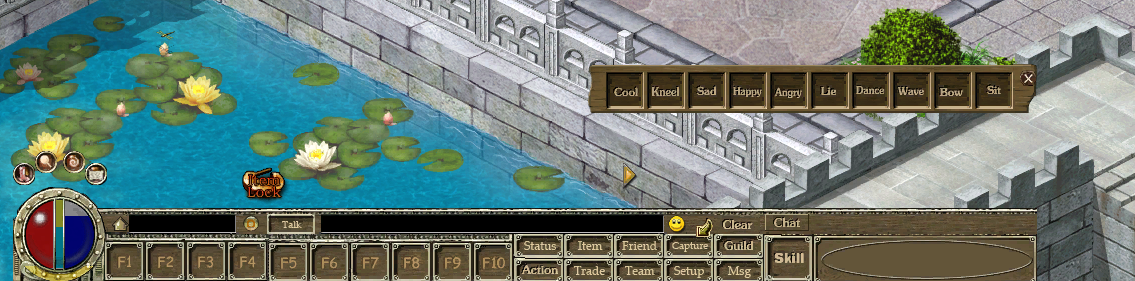
im not entirely sure what "action button" you are talking about but there is a possibility I know what you are talking about and have already worked on it or messed with it. i ended up moving up to the latest patch retail CO is on to make sure future proofing is at its fullest capacity. are you talking about this action button? I have not gotten into removing buttons and moving them to different IDs or anything quite like that yet but from my understanding with how different the 3.0 clients are and how much LUA is used in it now you should be able to do just about anything with the gui. you could find where the emoji icon is and replace it with the older "action" button image and then adjust how the child IDs are laid out so they are in a line and change the background as well. it all can be done through gui.ini, control.ani and inside of the data folder. you really wouldnt even have to edit it control.ani unless you want to add new buttons/image IDs for gui.ini to grab from. it can all be done fairly easily since you can just null out the interact, dance and emotion tabs or set it up in a way to add a button on the action tab that will then open the emojis. hopefully thats what you were talking about and sorry for the mess of writing **edit** just looked through the ini folder on a 3.0 client and from my understanding you can literally add your own GUI buttons/IDs and then edit a file like "MainSimple.lua" to make that button you just made show up on screen and then from there you would need to link it to something either through a custom made lua file or through the lua file that originally controlled that feature.
-
not sure if this will help you much but here is a no effects file for players to use on startup if they dont want effects on, it is for a 5695 server/client. you can use a wdb manager/tool and decrypt it and look at the files to compare it to the client you are working on and so you get an idea of how disabling effects works. you can also edit "Action3DEffect.ini" or make it blank and that will kill all effects on garments, mounts, weapon accessories and iirc other effects like dragon souls and what nots. If you are trying to make things load in quicker then i would look into making mesh and texture files on all the files in the c3 folder smaller, the smaller the files the quicker they load for example most conquer online garms are around 30-60kb for the mesh and texture files but most garms made by other people are around 150kb up to 1mb for the mesh and texture files. if you have one person wearing a garment that has a mesh file over roughly 250kb it will cause everything to take longer to render/load in. lets say that player is sitting in twin city square and is wearing a garment that has around a 300-400kb .c3 mesh file size, when you first teleport to twin city or start up the client it will take longer than normal for everything to load like npcs, players, guards, monsters and what nots. in terms of trying to actually optimize the conquer client itself you will be doing a whole lot more than editing a couple ini files. I suggest looking into the mesh and texture file sizes in your client and using blender to make them smaller. "factory" conquer online stuff loads in for the most part instantly and there really shouldn't be any lag at all in game unless there was something "aftermarket" causing it like heavy files, unstable host or maybe even a shit source. everything related to figuring out step 1 is looking through the c3 folder, there are .c3 files and .dds files the .c3 files are the mesh and the .dds files are the texture. its all controlled in the ini folder through 3DEffect.ini, 3DEffectObj.ini, 3dobj.ini, 3dtexture.ini and then Action3DEffect.ini is how you attach the effects to an items ID and then there is other files like weapon.ini and armor.ini that are for adding gear in game along with the other files i stated in this message. sorry if my messages are a bit messy or difficult to read i tend to carry on and go all over the place but for the most part that is 99% of the info needed to look around at how its all controlled or handled in the clients and that is on any patch. DisableEffect.exe
-
[Source 6609] How to change the default active tab in Forging UI
Paradox replied to NourSoliman's topic in Conquer Online
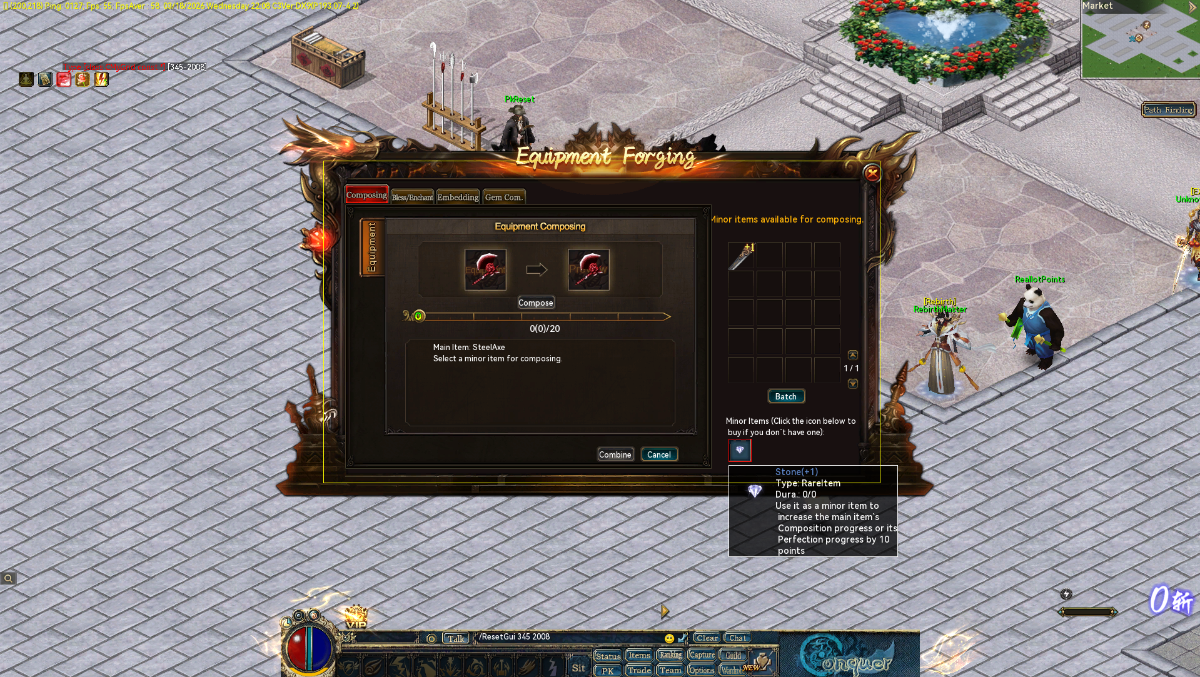
I did exactly that in my process of making a 3.0 setup "classic". this is what I did for my WuxingOven npc to make it so players had to talk to that npc to open the forge menu, its also removed from the main UI and was edited in gui.ini so only classic like features were there. All they do is click on the npc like normal and then choose that they want to compose or bless there gear through the npc dialog and when they choose that option this forge menu opens. I had an issue with opening specific pages so it was a bit easier to just have the oven npc control/advertise those 4 forging areas instead of having an npc for each upgrade type like a blessing npc, enchantment npc and gem npc, which is what I wanted to originally do. if you can figure out how to make it open an exact page then maybe you can bless me with some info back but I did try a ton of different things to open specific pages, just couldn't get it to work. IIRC it defaults to the compose page when first opened. case 1: { ActionQuery action = new ActionQuery() { Type = ActionType.ClientCommand, ObjId = client.Player.UID, dwParam = 0, PositionX = client.Player.X, PositionY = client.Player.Y, Timestamp = (uint)Time32.timeGetTime().GetHashCode(), Strings = new string[] { "LuaUIMgr_OpenWindow|335" }, }; client.Send(stream.ActionCreate(action)); break; }
-
yeah its unreal how big 30kx20k png images are size wise lol. thats how i got all of these, the 12gb file is around 200 maps iirc and the smaller file is just tc, dc, bi, ac and pc. I figured there is probably a ton of people who are good with PS and other editing stuff in the conquer community but dont have a way to use any of that knowledge/skill because nobody has ever shared full proper resolution images and placing each dds image together 1 by 1 blows so hope this will help some people out there. They could also use tiled2dmap to reverse them back into dds images or atleast properly sized images that you can convert back into .dds types if im not mistaken and then just replace the files back in the client and there ya go custom maps. Even if it helps just 1 person im happy with it.
-
i just made a post with the pngs here a couple hours ago. the tile2damp setup is public also
-
Have yet to see anyone make a release or share anything like it so here is the conquer online main city maps turned into a 1:1(as far as i know) copy of how it would look as a png. Most map programs use PNG images or other types of high resolution images to turn that picture into a map but not everyone has the ability to do so or there is something similar like not having original map files that is stopping them from making custom city edits so here you guys go! all i ask for is a thanks and if you make some edited version of the main cities please share them back to brighten the community a bit. I have personally used them to make a new map as a test and they are exactly the same size as the original maps along with placement of the town placements. Keep in mind that there is no map objects or anything else on these images so you would either reuse the original map objects or add your own with a map maker/editor tool. https://mega.nz/file/xzljwRzI#84vWgLG6sNKr_pA4tJiQoL4FNIFjWUUXKkxnIjEogUc https://drive.google.com/file/d/1n0CgTwb1W9peJFzIYQmGECa0ufh308aG/view?usp=sharing the first two links are of just the main cities and this link below is just about every map in the client ranging from 5017 up to 6609, enjoy! https://drive.google.com/file/d/134HqQEwEHjvRiQYZLVAExEmhlLLTz6H3/view?usp=sharing