
duki
-
Posts
29 -
Joined
-
Last visited
Content Type
Profiles
Forums
Downloads
Store
Everything posted by duki
-
The web map viewer has been updated. I added a few official maps (about 85% quality, I'll upload lower/faster ones soon ). Updated / Added: - NPC positions and names - Mob and guard positions/zones with names - Mobile support - Removed the old dmap access grid format and switched to direct dmap access (https://co-stuff.github.io/web-floor-editor/) Maps ready to view (v6609 maps/npcs/mobs): - TwinCity (n-newplain) - Forest (woods) - Desert - MysticCastle (d_antre01) - Island - Stable (horse) - Canyon - MineCave (mine01) - NPCJail (mine-one) webmap3.mp4
-
Thanks, I'm glad this can be useful for others in the future... and yeah, TQ always did funny stuff You're right. I forgot to import WDF, so many covers/objects and even some map textures were missing... silly me
-
Thanks! Even though its far from being perfect, it still lacks some map effects (falling flowers, maze orbs, or even some covers/scenes from common maps), but I think its a good starting point to build something new on top. In the C++ version im still playing around with optimizations and stuff like this: cppmap.mp4
-
Map viewer built around my export format (JSON + JPEG atlases + sprite strips). Three.js, no server needed, just open index.html. The C++ version will be posted in the next few days separately, both projects have enough features on their own to keep each post short and they can be used independently. Some ideas for usage: overlay Mobs/NPC/guard positions on the map, player backtrack/movement history, heatmaps for player activity zones, or just browsing maps without the client. I hope someone find this useful & get creative with it. References: wiki/Dmap, wiki/DmapLayerType & EO-Map implementation. Preview: webmappreview.mp4 There are few maps that you can try in the live demo, depending on the map, it will take longer to load. tc: 33MB, desert: 15MB, desert10: 5MB, island: 11MB Live demo: web-map-viewer-demo. Repository: web-map-viewer
-
Enjoy. References: wiki/Dmap & spirited/floor (so basically shoutout to: @Spirited ) Preview: floorEditorOld.mp4 Live demo: web-demo Repository: cpp-version (win32 + imgui/dx11 and basic optimizations) & web-version (three.js).
-
Yeah... but would be cooler doing the entire client from ""scratch"" based on wiki's & old leaked bases... Few years ago i hooked their dx10/dx10.1, it was funny to play around w/ those clients, loved the fact they used Themida® to prevent RE easily. As far i know, there is a new dx11 client from other groups that is based on the EO-leak.
-
Updated & moved code to repo (link). The code is ready is ready to compile, the only thing you'll need to do is adding external libraries & including it to your own project which would take you less than 1 minute to do so.
-
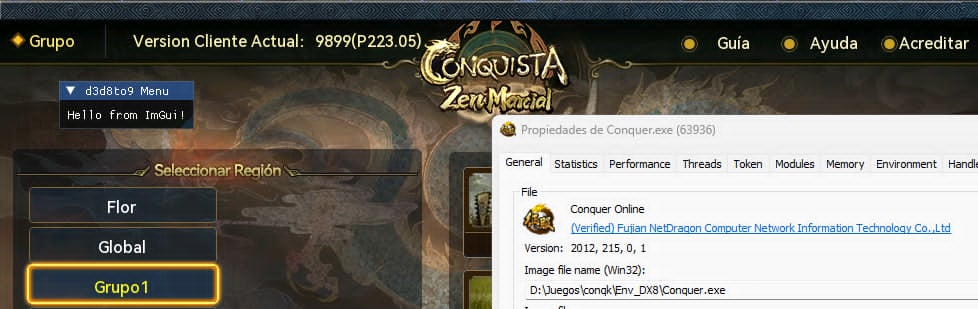
Using crosire's d3d8to9 you can render imgui re-using the same base. Actually this uses d3d9 to render imgui, re-using d3d8to9 existing functions. The source only includes modified functions + imgui handler instead of the entire base to make it more simple. Btw you could simply use the og d3d8to9 base & render imgui with other module (or use my other post example) Tested on 5517/6609 clients & latest's dx8 game version. Source

-
dumb ideas are my passion imguirenderStatic.mp4 imguirenderv2.mp4 imguirender.mp4
-
Based on my previous post ( D3D9-BASE )... Here's just a quick setup to include IMGUI into Conquer, using og device & handles. This include might not be the best way to do it, and it could be improved a lot (as the title says, it's a quick setup). If you have any ideas or suggestions to improve it, I’ll happily update the post! I tested on newer versions of the game and it still working (also tested on 6609). Code: Link Preview: imgui.mp4
-

Does the guy that made Conquer Classic have an actual client source code?
duki replied to Zedaf's topic in Conquer Online
getting d3d9 base ( D3D9-base ) and hooking endscene + reset imgui.mp4
-
OpenConquer: My first conquer server emulation project
duki replied to Berniemack's topic in Projects
Cool -
Yeah, that would be cool thing to do without fully getting into reverse-engineering the game, and it could even be almost "universal" across all DX9 versions of the game. I tested a few things with this hook, like rotating them or making them bigger by multiplying their matrix. goofy ah pheasant rotating with wrong axis xD:
-
Following my previous D3D9-Base setup, here's an example using it for a simple DIP (DrawIndexedPrimitive) hook. Wireframe example code targeting pheasants: typedef HRESULT(WINAPI* tDrawIndexedPrimitive)(LPDIRECT3DDEVICE9, D3DPRIMITIVETYPE, INT, UINT, UINT, UINT, UINT); tDrawIndexedPrimitive oDrawIndexedPrimitive = nullptr; HRESULT APIENTRY hkDrawIndexedPrimitive(LPDIRECT3DDEVICE9 device, D3DPRIMITIVETYPE dType, INT baseVertexIndex, UINT minVertexIndex, UINT numVertices, UINT startIndex, UINT primCount) { //targeting pheasants models (mainly 6609 clients) if (numVertices == 420 && primCount == 544) { DWORD dwOldFillMode; device->GetRenderState(D3DRS_FILLMODE, &dwOldFillMode); device->SetRenderState(D3DRS_FILLMODE, D3DFILL_WIREFRAME); //here you could return directly, to make it more noticeable oDrawIndexedPrimitive(device, dType, baseVertexIndex, minVertexIndex, numVertices, startIndex, primCount); device->SetRenderState(D3DRS_FILLMODE, dwOldFillMode); } return oDrawIndexedPrimitive(device, dType, baseVertexIndex, minVertexIndex, numVertices, startIndex, primCount); } This example code has only wireframe "effect" for the texture targeted (pheasants), but you can change the colors of the texture too (know as Chams), gather realtime w2s positions, adding effects/shaders, etc. Some preview of how it could work (chams & w2s from texture):
-
Silly hook to "always" jump without the game being focused. Grab og function: typedef BOOL(WINAPI* tGetKeyboardState)(PBYTE); tGetKeyboardState oGetKeyboardState = GetKeyboardState; Our function: bool alwaysJump = true; //could be toggleable in menu or using a keybind BOOL WINAPI hkGetKeyboardState(PBYTE lpKeyState) { BOOL result = oGetKeyboardState(lpKeyState); if (alwaysJump) lpKeyState[VK_CONTROL] |= 0x80; return result; } Then you can use your desired hook method.
- 1 reply
-
- 1
-

-
Simple find pattern: uintptr_t findPattern(uintptr_t start, size_t length, const std::vector<int>& pattern) { auto patternLength = pattern.size(); auto data = reinterpret_cast<const uint8_t*>(start); for (size_t i = 0; i <= length - patternLength; ++i) { bool found = true; for (size_t j = 0; j < patternLength; ++j) { if (pattern[j] != -1 && pattern[j] != data[i + j]) { found = false; break; } } if (found) { return start + i; } } return 0; } Then get the base: auto d3d9Module = reinterpret_cast<uintptr_t>(GetModuleHandleA("d3d9.dll")); std::vector<int> pattern = { 0xC7, 0x06, -1, -1, -1, -1, 0x89, 0x86, -1, -1, -1, -1, 0x89, 0x86 }; auto d3dBase = findPattern(d3d9Module, 0x128000, pattern); auto d3dVMT = *reinterpret_cast<uintptr_t**>(d3dBase + 2); And you can use it normally: oDrawIndexedPrimitive = reinterpret_cast<tDrawIndexedPrimitive>(d3dVMT[82]); oEndScene = reinterpret_cast<tEndScene>(d3dVMT[42]); oReset = reinterpret_cast<tReset>(d3dVMT[16]); Check out d3d9 indexes here: https://pastebin.com/raw/QbPhkCKh Note: you'll need to grab d3d9 Device from EndScene You can use this to properly render imgui. - Check out how DrawIndexedPrimitive could be implemented: DIP-Hook
-
Yeah that's possible, if you have a prefix of the item such as "[S]" -> Super or any other prefix you can do that Example targeting "(3rd)" You can prevent it from being draw, add to a list of drawable items & re-render it in endscene. I'll upload in a few days my old imgui project for d3d9 client.
-
This is just a proxy to load your own module into the game without modifying or injecting a DLL into the client, while maintaining the chat functionality (Chat.dll manages private message window creation)
-
Forgot to mention: newer versions of the game uses ShowStringW Function: ?ShowStringW@CMyBitmap@@SA?AUC3_SIZE@@HHKPBGPBDH_NW4RENDER_TEXT_STYLE@@KUC3_POS@@@Z Example: typedef struct { int width; int height; } C3_SIZE; typedef struct { int x; int y; } C3_POS; enum RENDER_TEXT_STYLE { STYLE_DEFAULT = 0, STYLE_BOLD = 1, }; typedef C3_SIZE(__cdecl* tShowStringW)(int, int, DWORD, const wchar_t*, const char*, int, bool, RENDER_TEXT_STYLE, DWORD, C3_POS); tShowStringW oShowStringW = nullptr; C3_SIZE __cdecl hkShowStringW(int iPosX, int iPosY, DWORD color, const wchar_t* pszString, const char* pszFont, int nFontSize, bool bAntialias, RENDER_TEXT_STYLE style, DWORD secondColor, C3_POS ptOffset) { //call og function }
-
Newer versions of the game changed to ShowStringW. ?ShowStringW@CMyBitmap@@SA?AUC3_SIZE@@HHKPBGPBDH_NW4RENDER_TEXT_STYLE@@KUC3_POS@@@Z You can make changes in real time to the content with this too.
-
Then this will help you: post
-
ShowString from `graphic.dll` Some versions of the game may use `ShowStringEx` or `ShowStringW`. Some ideas: - Create unique player names for specific players - Customize guild name size or style - Custom NPC names - Custom MOB/entity names - Custom Server name - Custom FPS / PING display - Render stronger outlines - Store strings data & re-render with your own system Modifications can be done in real time, such as changing the font size, current font type, and more. Example Code targeting FPS/Ping display: Gitlab Preview: